

Pricing Engine
Price every shipment accurately with a powerful rule-based engine that handles any tariff structure, including dynamic fuel surcharges.
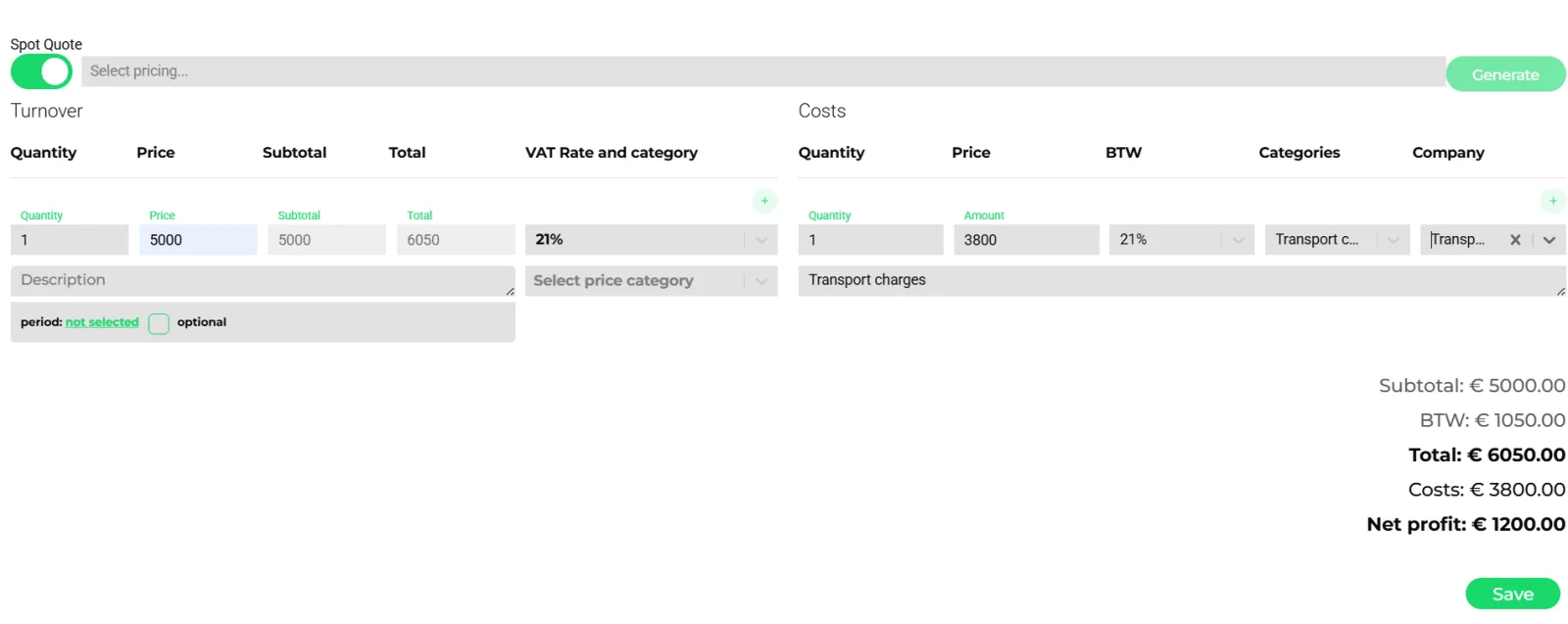
- Select a pricing and press Generate to fill the lines
- Turnover lines with VAT rate and pricing category
- Cost lines per category and company
- Subtotal, VAT, total, costs and net profit
Pricing in freight is complex: zone-based tariffs, per-pallet rates, fuel indices, minimum charges, volume discounts. Transportial's pricing engine handles all of these with a flexible rule system and TQL (Transportial Query Language), a SQL-like syntax for building data-driven pricing rules without writing code.
What it does
Everything this module does, named the way you will find it in the product.
Module types for every tariff shape
A pricing is a set of modules evaluated against the order, shipment, trip or resource.
- Fixed, unit, time, percentage
A fixed amount; a price per unit (mi, mile, load meter, kg, shipment, action, goods, item, equipment); time-based per second up to per year at trip or action level; a percentage over earlier modules (the classic fuel surcharge).
- Zone, A-to-B, table
Zones by country, city, postal code, street or exact location; lane prices from A to B, optionally reversible; rate matrices with rows in kilograms and cells in miles or other units, pasteable from Excel.
- Variable adjustment (indexation)
Fixed or percentage changes against a price variable index such as a diesel index, per difference from a base level. This is how fuel clauses are modeled.
- Formula, TQL formula, field
Free formulas, TQL-driven formulas over any data, or an entity field times a factor.
- Grouping and subscriptions
Module groups, highest-of or lowest-of selections, element modules per pricing category, and subscriptions billed weekly to yearly with pro-rata and allocation by trips, hours worked or miles driven.
Where a pricing applies
- Entity types
Fleet vehicle, vehicle, trip, transport order, shipment, chauffeur, transport equipment or accumulated data, at move-action or shipment level.
- Invoicing cadence
Trigger types end of trip, end of transport order, end of week, week or month, month, quarter, year, or monthly, quarterly and yearly from a start date.
- Contracts
Customer and contractor contracts carry a pricing, validity dates and delivery terms; a setting can restrict quoting to active contracts with agreed rates.
- Options
Direct pricing, combine per customer, self-billing, once per invoice, reverse, and tax rates per line.
From price to ledger
- Pricing categories
Each category carries credit and debit ledger codes, so a quote line already knows its accounting destination; a description template formats the invoice line.
- Cost side
Default driver and vehicle cost pricings turn routes into expected cost; toll from routing posts to its own category. Net profit is visible on the quote before it is sent. See routing.
- Expected vs actual
Ledger entries hold expected and actual debit and credit per business and category, with variance charts on the order, trip and dashboards. See invoicing.
- AI price module generator
Describe a tariff or upload rate cards, contracts or price lists and the modules are generated for review.
How it works
Model the tariff
Create a pricing with modules: a zone matrix, a per-LDM unit price, a fuel percentage, a waiting-time module per action hour. Or let the AI generator draft it from your rate card.
Attach it
Put the pricing on a customer contract, a capacity contract or a resource, with validity dates.
Generate the quote
On the order, select the pricing and press Generate. Turnover and cost lines fill in; edit them if needed.
Send and convert
The customer accepts or declines on the public quote link; accepted quotes become orders and later invoices. See invoicing.
Reconcile
Expected revenue and cost sit next to actuals in the ledger, per order, customer or lane.
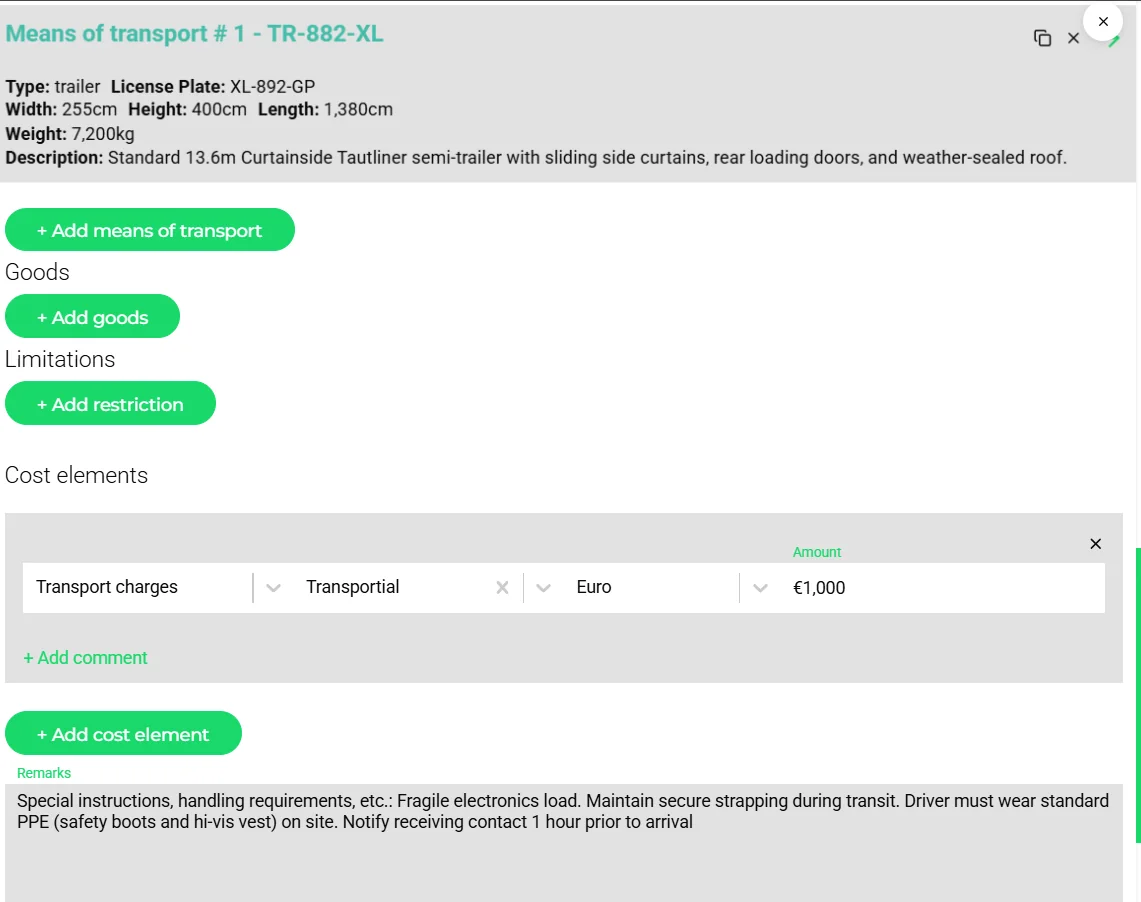
Tariffs are data, not spreadsheets with macros
Real freight tariffs mix shapes: a zone matrix by ZIP code, a minimum charge, a per-pallet rate above a threshold, a diesel clause, a waiting-time rate after the first hour. Transportial models each as a module and lets modules combine, select the highest or lowest, or nest into groups. The whole tariff is evaluated by the engine at quote time and again at invoice time, so a price is reproducible months later.
Indexation deserves a specific mention. A price variable index (a diesel index, a wage index) is maintained once, and every variable-adjustment module referencing it recomputes from the difference to its base level. No re-keying of surcharges on the first of the month.
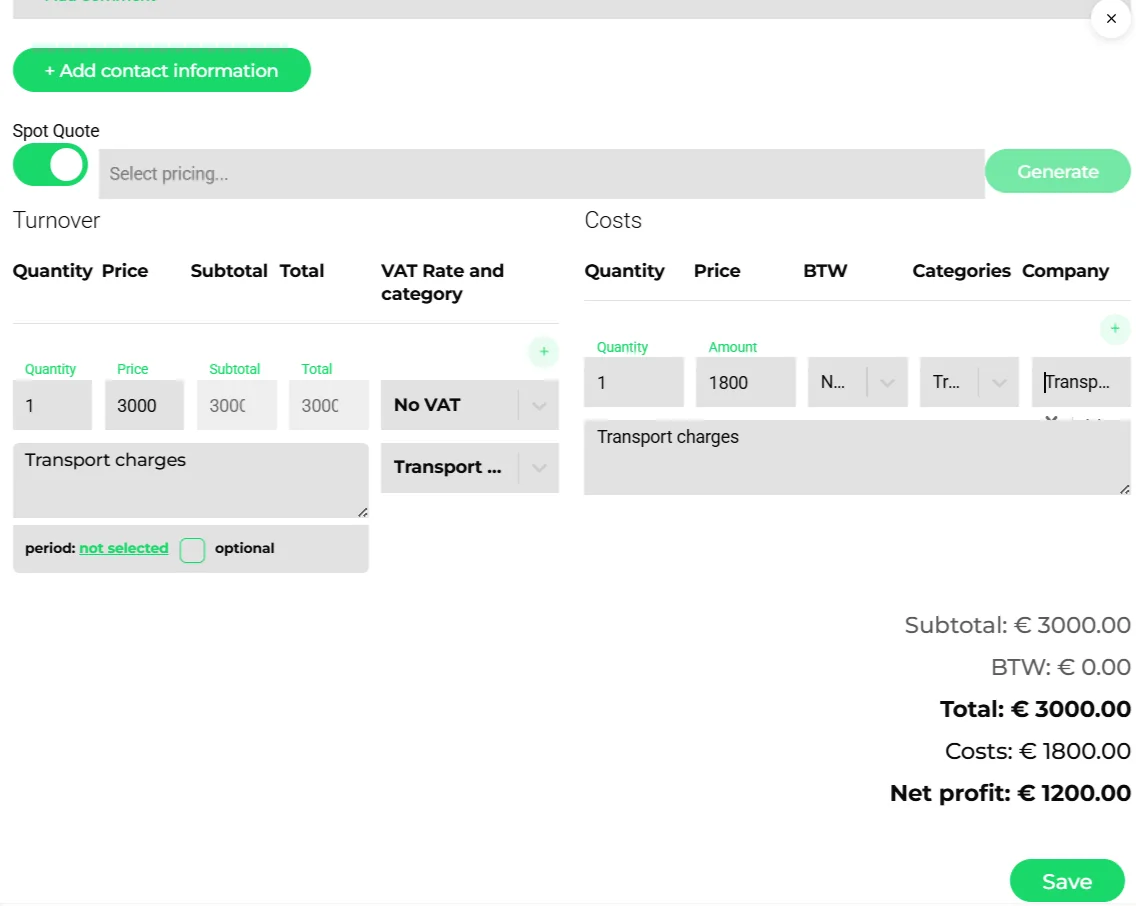
Price and cost on the same screen
A quote without its cost is a guess. Because driver and vehicle cost pricings, toll from the route and subcontractor rates from capacity contracts all produce cost lines in the same ledger, the spot quote shows net profit before it leaves the building. The negative-margin alert on the plan board catches the trips where the plan drifted from the quote.
Concepts & terminology
The words this module uses, with links to the full glossary where a term has its own page.
- Pricing
- A named tariff: a set of modules, a target entity type, a trigger type and options such as combine per customer or self-billing.
- Pricing module
- One rule inside a pricing: fixed, unit, time, percentage, zone, A-to-B, table, variable adjustment, formula, TQL formula, field, element, group, highest or lowest of, subscription, or Excel matrix.
- Pricing category
- A label with credit and debit ledger codes that classifies each line for invoicing and accounting.
- Price variable indexGlossary
- A time series such as a diesel index that variable-adjustment modules use for indexation.
- Trigger type
- When a pricing produces invoice lines: end of trip, end of order, end of week, month, quarter or year, or periods from a start date.
- Spot quote
- A one-off quote on an order, generated from a pricing or typed by hand.
- Ledger
- Expected and actual debit and credit entries per business and category, derived from quotes, invoices, trips and costs.
- Self-billing
- Invoicing on behalf of the supplier: the executed work under a capacity contract becomes a purchase invoice automatically.
Try it free first
Free tools that do part of what Pricing Engine does, no account needed. When doing it one by one gets old, the module does it for every order automatically.
Built for
Where this module carries the most weight.
TQL is compiled to a structured calculation tree and evaluated server-side at price calculation time. Variable indices are fetched from external APIs on a configurable schedule by the Worker backend node.
Frequently asked questions
Can I import my rate cards?
Yes. Table and Excel modules take pasted matrices, and the AI price module generator drafts modules from uploaded rate cards, contracts or price lists.
How are fuel surcharges handled?
Either as a percentage module over the freight lines, or as a variable-adjustment module indexed to a diesel price variable, so the surcharge follows the index automatically.
Can I price waiting time?
Yes. Time modules at action level price waiting per minute or hour, and can start after a free period.
Do quotes show margin?
Yes. Cost lines from driver and vehicle cost pricings, toll and subcontractors sit next to turnover lines, and net profit is shown on the quote.
Can prices differ per customer?
Yes. Contracts carry a pricing with validity dates and delivery terms per customer, and a setting can require an active contract with agreed rates.
What is TQL used for in pricing?
TQL formula modules compute a price from any data reachable by query, for instance the number of stops in a ZIP code area or the sum of pallets across an order.
View all features
Ready to put this to work?
Start free with full platform access, or talk to our team about your specific operation.